MUI X Scheduler v9 alpha

José Freitas
@joserodolfofreitasThe Scheduler is a new advanced component in MUI X aimed at time‑ and resource‑centric applications: not just a decorative calendar, but events bound to people, rooms, equipment, and projects, with interactions that match how real products work.
We're shipping it in alpha: useful for prototypes and roadmap planning, but the APIs are subject to change until the stable release—and we're hoping to get your feedback so we can move through this phase quickly.
This post explains what we're building, how Community and Premium differ, and where it sits next to Data Grid, Charts, and Chat.
For line‑item changes, follow the MUI X releases timeline.
This new major is part of a coordinated effort across the entire product suite; for a complete look at the MUI ecosystem changes, check out the Introducing Material UI and MUI X v9 blog post.
Table of contents
- Quick start
- What alpha means
- When to expect the stable
- What you can build
- Event Calendar
- Fit with the rest of MUI X
- Event Timeline
- Community and Premium
- What's next
Quick start
Install the package and render the Scheduler in minutes: start in the MUI X Scheduler docs and follow the quickstart guide for your first working calendar. Then layer your event model and resources on top, and switch to Event Timeline when your use case needs dense resource planning.
What alpha means
We expect the same release arc that we've followed for other advanced components: alpha, then beta, then stable, with migration notes as the surface hardens. Today, that means you can prototype and send feedback—don't assume imports are frozen or that slot APIs can't be changed. If you've shipped on Data Grid or Charts through early majors, the process should feel familiar.
When to expect the stable
We're targeting a stable Scheduler release in early July, based on the feedback and usage signals we collect during alpha. The date is an expectation, not a hard promise: we ship when quality is there.
Keeping Scheduler in alpha right now is intentional because it gives us the room to make necessary breaking changes before the next major, while APIs are still being validated in real projects.
What you can build
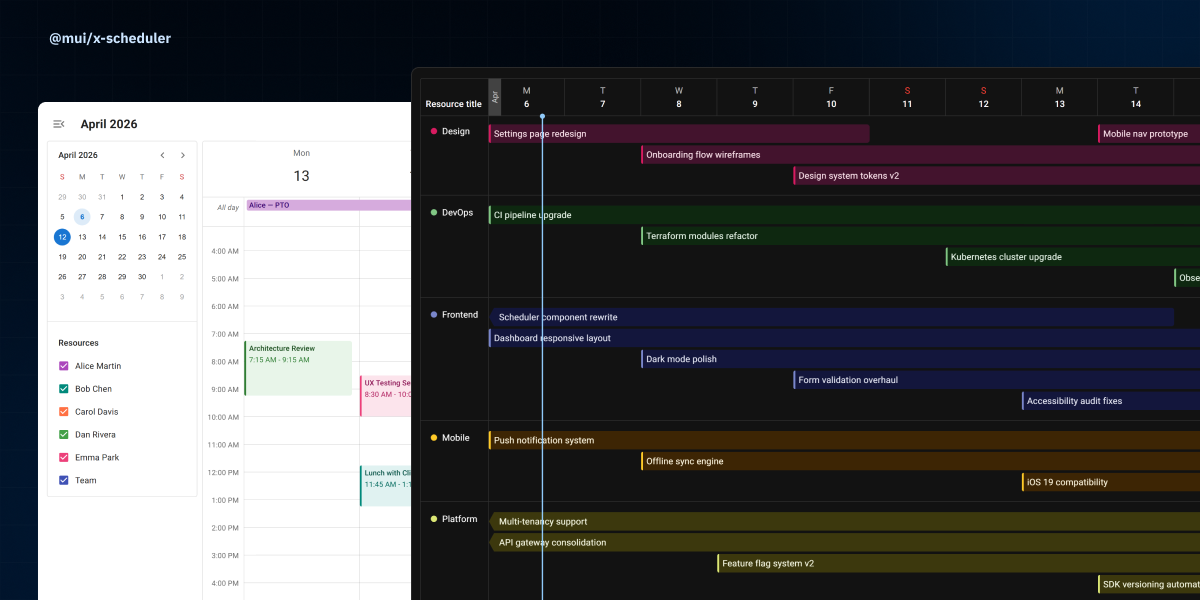
At the center is an event model with start and end times, titles, and metadata that you link back to your business logic.
You can group those events under resources representing people, rooms, assets or looser groupings that match your product.
Recurring events support practical scheduling patterns: daily/weekly/monthly and custom rules, editable as a full series or one‑off exceptions, with timezone-aware evaluation so a daily 09:00 meeting stays at 09:00 local time across DST changes.
Timezones are modeled so you can store canonically (for example, UTC), render in the user's zone, and lean on the stack for DST and regional rules instead of reinventing offsets in every app.
Event Calendar
Event Calendar views read like classic planners: day, week, month and agenda.
They suit appointment booking, service desks, team coordination, and smaller‑scale capacity questions where users think in calendar blocks first.
This is the best default when your users already understand calendar metaphors and need fast navigation across dates with a lightweight resource context.
Fit with the rest of MUI X
Technically, Scheduler follows the v9 peer and theme story: align versions with Material UI and sibling MUI X packages, use shared theme augmentation and sx like the rest of the line, and keep Premium features packaged so you opt in explicitly.
Conceptually, it closes a gap: Data Grid for tabular workflows, Charts for visual analytics, Scheduler for resource management and capacity, and Chat for conversational assistance. Together, they're the workflow-heavy side of the stack we're shipping in v9.
Event Timeline
The Event Timeline puts time on one axis and resources on the other, which is the model teams use for scheduling operations. In this alpha, Event Timeline is available as a preview feature under the Premium plan.
It fits dispatching, workforce shifts, room/equipment allocation, manufacturing plans, and logistics boards where the key question is "who is doing what, when" across many parallel resources.
The point is one underlying schedule that can be re-visualized without rewriting your domain layer: start in Event Calendar when date-first UX is enough, move to Timeline when resource density and conflict management become central.
Community and Premium
As with other MUI X products, Scheduler ships with open-source and commercial tiers (see MUI X pricing).
The Community plan (MIT) targets the core interactive calendar: resource‑aware layouts, multiple views, drag to move and resize, and a fast path to a credible scheduling UI without hand‑rolling hit targets and drag-and-drop.
Premium (commercial) adds what enterprises usually need next: recurrence, lazy loading, and richer timeline experiences for dense schedules, with virtualization for huge event grids planned for the stable release.
Most teams can prove UX on Community and move up when recurrence or massive event counts demand it.
What's next
- Event Timeline virtualization, lazy loading, and infinite loading.
- Resource views for the Event Calendar.
- Mobile version for the Event Calendar.
- Integration with existing calendars (ICS import/export, Google Calendar sync, and more).
Further reading
- Material UI and MUI X v9 overview
- Material UI v9
- MUI X Data Grid v9.0
- MUI X Charts v9.0
- MUI X v9.0: Tree View, Date Pickers
- MUI X Chat v9 alpha
We want your feedback
Your input drives our direction. Join our GitHub communities today to share your insights, report issues, and help shape the future. Visit MUI X on GitHub.