Data Grid - Formula engine
How the formula engine parses, evaluates, and re-computes cells—and how to extend it with your own functions.
This page describes how the Formulas feature evaluates cells, and how to extend the engine with custom functions.
How it works
The formula source is stored only in the row data—everything else is derived from it. A dedicated engine parses each distinct source once, tracks which cells every formula reads, and evaluates in dependency order. The results form a lookup that the grid consults whenever it needs a cell value:
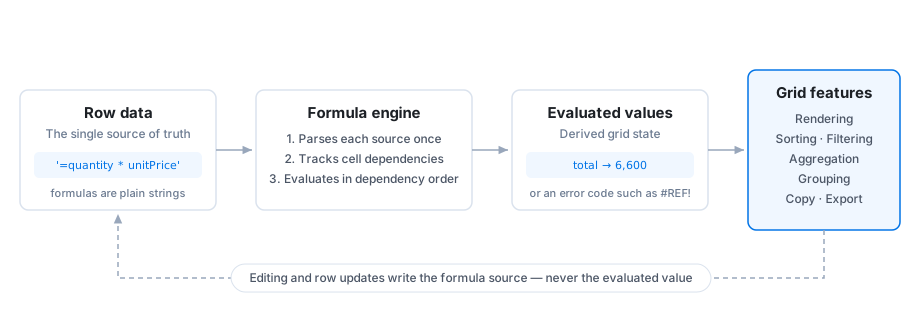
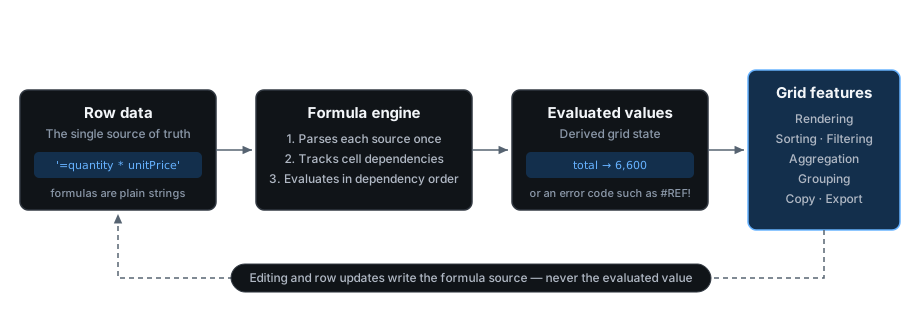
Because the source of truth never leaves the row data, persistence comes for free: processRowUpdate receives the formula source, undo and redo replay it, and controlled rows work unchanged.
When a cell changes—through editing, updateRows(), or a paste—the engine re-evaluates only that cell and its transitive dependents:
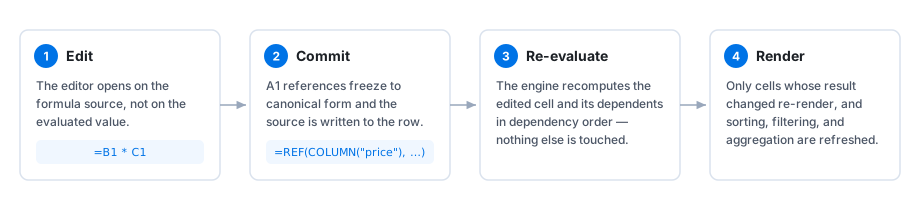
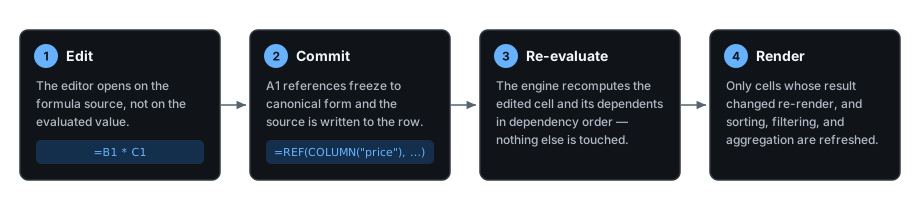
After each evaluation pass the grid emits the formulaEvaluated event with the list of changed cells.
Custom functions
Provide custom functions with the formulaFunctions prop.
The prop replaces the built-in set—spread GRID_FORMULA_FUNCTIONS to extend it:
import {
  DataGridPremium,
  GridFormulaFunctionDefinition,
} from '@mui/x-data-grid-premium';
import {
  GRID_FORMULA_FUNCTIONS,
  formulaFeature,
} from '@mui/x-data-grid-premium/formula';

const MARGIN: GridFormulaFunctionDefinition = {
  name: 'MARGIN',
  minArgs: 2,
  maxArgs: 2,
  signature: 'MARGIN(revenue, cost)',
  description: 'Gross margin as a fraction of revenue.',
  category: 'Finance',
  apply: ([revenue, cost], context) => {
    const income = context.coerce.toNumber(revenue);
    const expense = context.coerce.toNumber(cost);
    if (typeof income !== 'number') {
      return income; // pass the coercion error through
    }
    if (typeof expense !== 'number') {
      return expense;
    }
    return (income - expense) / income;
  },
};

<DataGridPremium
  featureDependencies={{ formula: formulaFeature }}
  formulaFunctions={{ ...GRID_FORMULA_FUNCTIONS, MARGIN }}
/>;
The autocomplete demo registers this exact MARGIN function—type =M in its Gross margin column to see the signature help in the dropdown.
A definition supports the following fields:
| Field | Description |
|---|---|
name |
Uppercase identifier (A–Z, 0–9, _). Reserved names such as REF or RANGE_REF are rejected. |
minArgs / maxArgs |
Accepted argument count. maxArgs: null makes the function variadic. |
apply(args, context) |
The implementation. Returns a number, string, boolean, Date, null, or an error value. |
lazy |
Arguments arrive as functions to call on demand—how IF skips the branch that is not taken. |
acceptsRanges |
Allows range arguments. Without it, passing a range produces #VALUE!. |
acceptsErrors |
Receives error arguments instead of propagating them—how IFERROR inspects its first argument. |
signature, description, category |
Optional metadata displayed by the autocomplete dropdown. |
The context argument provides coerce helpers (toNumber, toText, toBoolean, isEmpty, compare) that apply the same coercion rules as the built-in functions and return either the coerced value or an error value, plus currentCell with the id and field of the evaluating cell.
Ranges, lazy arguments, and errors
A range argument is an object of the shape { kind: 'range', values }, where values lists the scalar cell values in row-major order.
To fail with a specific error, return { kind: 'error', code, message } with one of the error codes—the message is informational only.
const SPREAD: GridFormulaFunctionDefinition = {
  name: 'SPREAD',
  minArgs: 1,
  maxArgs: 1,
  acceptsRanges: true,
  signature: 'SPREAD(range)',
  description: 'Difference between the largest and smallest value.',
  apply: ([arg], context) => {
    const values =
      typeof arg === 'object' &&
      arg !== null &&
      'kind' in arg &&
      arg.kind === 'range'
        ? arg.values
        : [arg];
    const numbers: number[] = [];
    for (const value of values) {
      if (context.coerce.isEmpty(value)) {
        continue;
      }
      const numeric = context.coerce.toNumber(value);
      if (typeof numeric !== 'number') {
        return numeric;
      }
      numbers.push(numeric);
    }
    if (numbers.length === 0) {
      return {
        kind: 'error',
        code: '#VALUE!',
        message: 'SPREAD needs at least one number.',
      };
    }
    return Math.max(...numbers) - Math.min(...numbers);
  },
};
With lazy: true, each entry of args is a function instead of a value—call it to evaluate the argument.
Arguments that are never called are never evaluated, which is how IF, AND, and OR short-circuit.
Selectors
Signature:
gridCellFormulaResultSelector: (apiRef: GridApiRef) => FormulaResult | nullExample
const cellFormulaResult = gridCellFormulaResultSelector(apiRef);Signature:
gridFormulaLookupSelector: (apiRef: GridApiRef) => GridFormulaLookupExample
const formulaLookup = gridFormulaLookupSelector(apiRef);